Argonne National Laboratory / Advanced Photon Source software for EPICS

QtEDM

Developed at Argonne National Laboratory, QtEDM keeps your MEDM ADL investment, moves to a modern Qt foundation, and gives operators richer plotting, export, search, and audit workflows without forcing a wholesale display rewrite.

Argonne software provenance

Built from the Advanced Photon Source controls tradition.

QtEDM is part of the MEDM / QtEDM Display Manager Suite developed at Argonne National Laboratory for EPICS display management. It carries forward the practical controls heritage of MEDM while giving EPICS teams a native Qt path for current workstations.

Why EPICS sites pay attention

A practical successor to MEDM, not a restart.

QtEDM keeps the habits, files, and operating model that existing facilities already depend on, then adds the parts people expect from contemporary control-room software.

Preserve the display library you already have.

Facilities have decades of operational knowledge embedded in ADL files. QtEDM reads those displays directly, supports the standard MEDM widget set, and keeps edit and execute workflows familiar for operators and controls engineers.

Modern toolkit

Qt reduces dependence on aging Motif packaging and improves font, rendering, and desktop integration options.

Operational gains

Find PV, archives, snapshots, sessions, display import, export, and audit workflows solve everyday control-room friction.

Controlled transition

Run QtEDM alongside MEDM to validate the shared ADL subset and identify screens that intentionally use QtEDM extensions.

Where QtEDM fits

Choose it when ADL compatibility is the adoption blocker.

EPICS sites have several display-manager choices. QtEDM is aimed at the specific gap between proven MEDM screen libraries and the need for a maintained Qt runtime.

MEDM

Legacy baseline

Best when exact Motif-era behavior is still required. QtEDM keeps the same core display format while reducing dependence on aging Motif packaging and rendering behavior.

caQtDM

Qt display-manager peer

Best evaluated as another Qt-native EPICS display option. QtEDM's distinguishing case is preserving MEDM-style ADL workflows in the same source family as MEDM itself.

Phoebus / CSS

Broader control-system platform

Best when a site is adopting that ecosystem. QtEDM is the lighter transition path when the priority is opening existing MEDM ADL screens with minimal operator retraining.

What improves

Familiar screens, stronger day-to-day workflows.

The value is not only that QtEDM opens legacy screens. It keeps the familiar display model while adding the runtime features current operations expect.

Interactive plots

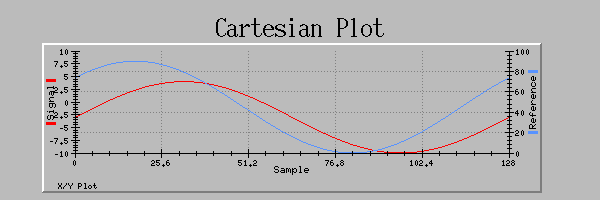
Zoom and pan Cartesian plots in execute mode, then export plot data to CSV or SDDS for follow-up analysis.

More signal views

Use Heatmap, Waterfall and Archive plots, NTNDArray images, tables, symbols, setpoint controls, and tabbed displays.

Find the PV

Search process variables across open displays and inspect connection status, update rate, and severity in one place.

Audit every write

Record built-in control, plugin-provider, snapshot-restore, and blocked observe-only writes with operator context.

Observe without writing

Start with --read-only to keep monitoring and navigation while centrally blocking CA, PVA, soft-PV, snapshot, and plugin writes.

Compare before restore

Capture display PVs, compare saved and live values, select nothing by default, and revalidate every chosen write immediately before restore.

Load historical context

Archive Plot loads bounded history from an Archiver Appliance or local provider plugin, then optionally merges live samples.

Import with evidence

Convert caQtDM or Qt Designer files to ADL with a preserved source, a versioned mapping report, and visible placeholders for unsupported objects.

Widget coverage

MEDM compatibility with room for modern diagnostics.

Existing graphics, monitors, controls, plots, related displays, and shell commands remain part of the workflow. QtEDM adds new views where the EPICS community has outgrown the old toolkit.

Live QtEDM demo display Help -> Demo capture
Animated GIF of the QtEDM Help Demo display with changing values, plots, heatmap, PV table, and waveform table
Control-room ready

One display language, richer diagnostic screens.

This capture follows the same Help -> Demo path in QtEDM, so reviewers see the built-in soft PVs, changing values, plots, tables, and image displays without requiring an external IOC.

Compatibility matrix

The transition boundaries are explicit.

QtEDM is strongest when teams understand which displays remain in the shared MEDM subset and which screens intentionally adopt QtEDM-only features.

Capability QtEDM status Transition note
Existing MEDM ADL display files Supported QtEDM reads and writes the same core ADL format used by MEDM.
Standard MEDM widget set Supported Graphics, monitors, controls, plots, related displays, and shell commands remain part of the workflow.
QtEDM-only extensions Extension New controls, tables, image/archive widgets, tabbed containers, plugin objects, and declarative rules use explicit QtEDM ADL blocks.
Round-trip back to legacy MEDM Shared subset MEDM can use the common ADL subset; displays that rely on QtEDM-only blocks are not behaviorally compatible with legacy MEDM.
EPICS Channel Access and PVAccess names Supported Use normal CA PV names or the pva:// prefix when PVAccess is required.
Observe-only operation Supported --read-only visibly blocks writes through built-in, snapshot, soft-PV, and plugin-provider paths.
Sessions and PV snapshots Explicit restore Layouts never auto-restore; snapshot rows are opt-in and revalidated before every write.
caQtDM / Qt Designer import Report-backed Version 1 accepts .ui input and classifies mapped, approximated, omitted, and unsupported objects.
Local extension API Version 1 Reviewed native plugins require metadata and exact Qt, compiler, architecture, and QtEDM compatibility.
Qt toolkit version Qt5 / Qt6 Qt6 is preferred when available, with Qt5 fallback support in the build notes.
Native desktop platforms Linux / macOS / Windows QtEDM works natively on Linux, macOS, and Windows when the local Qt, EPICS, SDDS, font, and packaging dependencies are satisfied.

Use this as a planning guide, then validate representative facility displays with local fonts, macros, EPICS environment, and operator launch scripts.

For operators and engineers

Make existing screens feel maintained again.

QtEDM is intentionally recognizable to MEDM users. The difference is that modern plotting, export, search, fonts, and logging are built into the runtime instead of bolted onto operating procedures.

  • Open ADL screens directly in edit or execute mode.
  • Use macro substitution and related displays for existing launch flows.
  • Export displays to PNG, SVG, JPEG, or BMP for reports and documentation.
  • Use expression channels for local derived values without IOC-side logic.
  • Use --read-only for monitor-only operation with visible write inhibition.
  • Compare saved PV snapshots with live values before selecting any controlled restore.
  • QtEDM Strip Chart widget examples QtEDM Meter widget examples QtEDM Thermometer widget examples
    Adoption path

    A migration strategy facilities can actually run.

    The strongest selling point for a control-system display manager is not novelty. It is the ability to improve the platform without breaking operating rhythm.

    Install beside MEDM

    Build QtEDM from the same source distribution and keep the legacy executable available during validation.

    Open real ADL files

    Start with representative screens, compare display fidelity, and document any local edge cases.

    Move targeted workflows

    Adopt QtEDM first where export, plotting, PV search, or Motif packaging pain is already costing time.

    Grow with confidence

    Use automated CLI, unit, IOC, and visual tests to keep compatibility measurable as adoption expands.

    FAQ

    Questions EPICS teams usually ask first.

    These answers are intentionally practical: they frame how to test QtEDM with existing displays before a facility-wide switch.

    Will my MEDM screens open?

    QtEDM is designed to read existing MEDM ADL files and support the standard MEDM widget set. Validate representative screens locally, especially displays that depend on site-specific fonts, scripts, macros, or window-management behavior.

    Can QtEDM run beside MEDM?

    Yes. The recommended migration path is to install QtEDM as a separate executable, keep MEDM available for edge cases, and move operators to QtEDM display by display.

    What if a display uses QtEDM-only widgets?

    QtEDM-only widgets extend ADL for newer use cases. Those displays should be treated as QtEDM displays and not as fully compatible legacy MEDM screens.

    Does it support PVAccess?

    QtEDM supports Channel Access and accepts pva:// PV prefixes when PVAccess is required.

    How do we build confidence before switching?

    Use the CLI, unit, IOC, and visual regression tests in this repository, then review important facility screens side by side with MEDM before changing operator launch scripts.

    How can we prevent writes during evaluation?

    Launch with --read-only. QtEDM stays in EXECUTE mode for realistic monitoring and navigation, shows a persistent red observe-only indicator, and blocks writes through built-in CA, PVA, soft-PV, snapshot, and plugin-provider paths. Blocked attempts remain distinguishable in the audit log.

    What platforms should we target first?

    QtEDM works natively on Linux, macOS, and Windows. Start with the platform your operators already use, then validate local Qt, EPICS, SDDS, font, and packaging constraints.

    Source, docs, and feedback

    Additional information

    Current QtEDM source

    Review the active MEDM / QtEDM source distribution and project history on GitHub.

    github.com/rtsoliday/medm

    EPICS Extensions

    Use the EPICS Extensions MEDM page for background on the long-running display-manager family.

    EPICS Extensions MEDM

    For QtEDM problems, comments, or questions, contact soliday@anl.gov. Useful bug reports include the QtEDM version, operating system, EPICS Base version, launch command, display files, and enough detail to reproduce the issue.

    Put QtEDM in front of your EPICS team.

    The next useful conversation is concrete: build it, open familiar displays, compare behavior, and show where QtEDM removes current operational friction.

    Quick local demo from repository root
    make -j4
    bin/<OS>-<architecture>/qtedm
    # Then choose Help -> Demo for the live soft-PV demo.
    
    make test-qtedm
    xdg-open docs/QtEDM.html