Appearance
Appearance & font size
QtALH starts with a modern appearance that keeps everything ALH operators rely on: the two alarm panes, the order of each row's controls, the menus and their keyboard shortcuts, ALH's alarm colors and letters, the mask and count notation, and the buttons of every dialog. Only the presentation is updated. The same choice applies to the editor, its dialogs, and runtime windows activated from that editor.
Modern or classic
From the repository root, launch the runtime or editor with:
sh
bin/Linux-x86_64/qtalh -mainwindow examples/minimal.alhConfig
bin/Linux-x86_64/qtalh -c examples/minimal.alhConfig
The runtime connects to the configured PVs; the editor does not start monitoring. On macOS or Windows, substitute your platform's executable path.
Add -style motif for the classic Motif-influenced appearance. -style fusion or another installed Qt Widgets style applies that style's controls and the desktop palette to the modern layouts; -style modern selects the default explicitly. -style=name also works. Style names are case-insensitive; the last occurrence wins. An unknown name reports the available styles before connecting to PVs. Environment style settings do not change the appearance.
Modern

- Acknowledge and severity buttons are rounded chips with ALH's colors and letters. Group names are bold. Configured masks and channel alarm data stand out; the default
<----->mask and group counts are secondary. - The selected row is tinted with an accent edge, so alarm colors stay readable. Rows highlight under the pointer and clicking anywhere on a row selects it.
- Drag the divider between the panes to resize them.
- The status area keeps ALH's lines. Expand Alarm legend to read the mask and alarm-count notation. Silence Forever: On is shown in bold amber.
- Errors also appear in a warning strip at the bottom of the window; dismiss it with its ✕ button.
- The palette is light, or dark when the desktop palette is dark.
Classic Motif appearance
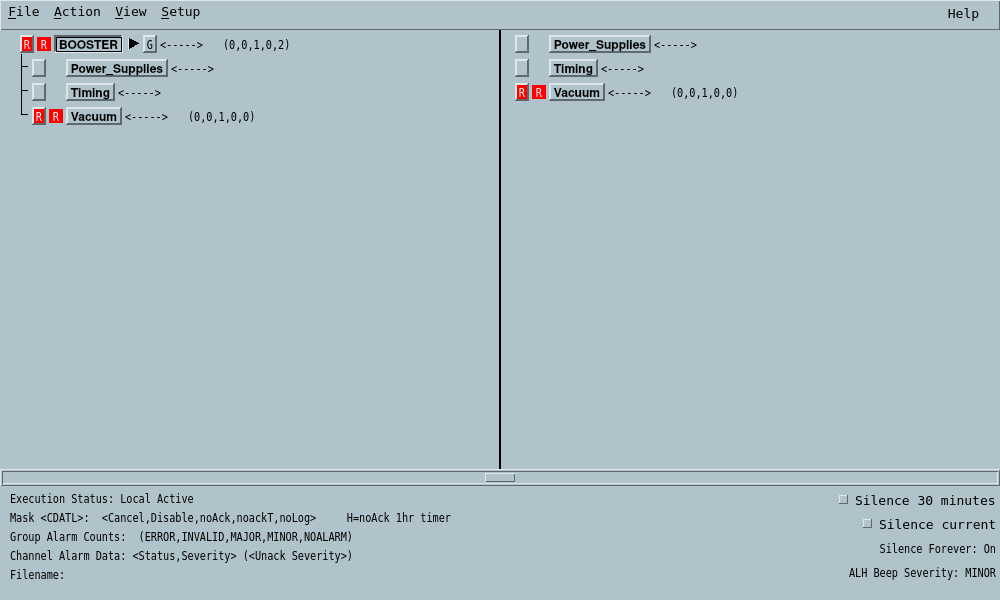
Both screenshots use repository test data rather than a live facility. Alarm colors, severity letters, mask meaning, blinking, and acknowledgement behavior are the same in both appearances. Typography and window decorations vary by platform.
Adjust the font while running
These shortcuts are available in every appearance except Motif:
| Action | Linux / Windows | macOS |
|---|---|---|
| Smaller by one point | Ctrl+− | Command+− |
| Larger by one point | Ctrl++ or Ctrl+= | Command++ or Command+= |
| Restore startup sizes | Ctrl+0 | Command+0 |
The default is one point smaller than the desktop's font size, with a minimum of 6 points. For example, an 11-point desktop UI font starts at 10 points in QtALH. The main UI can be adjusted from 6 to 72 points. Alarm rows and their click targets resize with the font, and open dialogs and new windows share the adjustment. Log/configuration text keeps its fixed-width family. Bare + and - still expand and collapse the alarm tree.
-fn, -font, and ALHMAINFONT still select only the compact runtime button's font. An explicit font starts at its requested size; the shortcuts adjust it relative to that size, and reset restores it.
Style and font adjustments last for this process only. No appearance preference is saved.
Dialogs and compact runtime
The compact window keeps its facility button and mask summary as one tile in the facility's alarm color. Click it to open the main window; it grows with its content and font size.

Dialogs keep their names, fields and buttons. In the modern appearance:
- Actions keep ALH's order (Apply, Reset, Cancel, Close) on the right, with Help on the left; Close replaces Dismiss.
- Modify Mask Settings highlights the current setting of each mask field; a group whose channels differ shows Mixed (n of m). Choices still apply immediately.

- Properties uses four tabs: General, Force PV, Commands, and Guidance. In the runtime, unset fields read Not set.
- Current Alarm History is a table with severity cells in alarm colors.
- Text viewers and log browsers share a find bar: press Enter for the next match or Shift+Enter for the previous one.
- Send Message, Stop Alarm Logging and Reload Facility use task-specific buttons (Send, Stop Logging, Reload).
File selection uses Qt's styled file dialog; printing uses the platform's print dialog.
For guidance and command previews, see G and P buttons.